We have compiled a list of manufacturers, distributors, product information, reference prices, and rankings for Support software.
ipros is IPROS GMS IPROS One of the largest technical database sites in Japan that collects information on.

Support software(3D CAD) - List of Manufacturers, Suppliers, Companies and Products | IPROS GMS

Last Updated: Aggregation Period:May 06, 2026~Jun 02, 2026
This ranking is based on the number of page views on our site.

Support software Product List

1~21 item / All 21 items

Displayed results

3D CAD convenience tool

Implemented a model quality check tool, achieving a reduction of 100 hours of labor annually.

In the "3D CAD Convenience Tools," we have developed unique tools to improve work efficiency and support the enhancement and review of design operations. In the current era where manufacturing with 3D data has accelerated, verifying data quality has become one of the most important tasks. To reduce this burden, we implement and automate parts of the work using 3D convenience tools, achieving a reduction in man-hours. 【Examples of Convenience Tools】 ■ Display Angle Matching Matching the display angle and magnification of active/inactive data ■ Automatic Modeling Tool Creating and modifying 3D models using Excel ■ Analysis Result Reading Tool Automating the reading of stress concentration points from analysis results *For more details, please refer to the PDF materials or feel free to contact us.

Added to bookmarks

Bookmarks list

Bookmark has been removed

Bookmarks list

You can't add any more bookmarks

By registering as a member, you can increase the number of bookmarks you can save and organize them with labels.

Free membership registration

2D/3D Sheet Metal Manufacturing Support Software "MACsheet Series"

Improve business efficiency and manufacturing systems! Software solutions for 'monozukuri' (manufacturing).

The "MACsheet series" enables the construction of systems that utilize existing systems and data without being constrained by manufacturers or models. Starting with "MACsheet SEG5," which allows anyone to easily create, edit, and generate unfolded drawings of 3D models with intuitive operations, we also offer a lineup that includes "MACsheet IST," a CAD/CAM software with enhanced nesting capabilities. We also provide "Taktory," a cloud-based process management system for sheet metal that allows real-time progress tracking and immediate responses to sudden inquiries from clients. 【Features (MACsheet SEG5)】 ■ 3D design CAD for sheet metal ■ Synchronization technology that enables intuitive operations ■ Import and utilize 3D CAD data ■ Utilize 2D data such as DXF ■ One-click unfolding of created models and imported data *For more details, please refer to the PDF materials or feel free to contact us.

  • 3D CAD
  • Other CAD related software
  • Other CAM related software
  • Support software

Added to bookmarks

Bookmarks list

Bookmark has been removed

Bookmarks list

You can't add any more bookmarks

By registering as a member, you can increase the number of bookmarks you can save and organize them with labels.

Free membership registration

3D Data Document Creation Support Tool 'Canvas X Pro'

A great ally for companies involved in manufacturing when creating technical documents that include 3D CAD data!

"Canvas X Pro" is a program that allows for the creation of various technical documents by directly importing 3D CAD data and utilizing technical illustration features. It enables the creation of all visual documents from start to finish without the need to switch to other applications, using 3D CAD model processing, display, and graphic functions. *Canvas X Pro is available only in English. [Canvas X Pro Video Links] (1) https://www.youtube.com/watch?v=3kYFbTRfsnQ (2) https://www.youtube.com/watch?v=u2BpH6uDAxY [About Canvas X Pro License Types] http://www.poladigital.co.jp/canvas/xpro.html *For more details, please refer to the PDF materials or feel free to contact us.

  • Image Processing Software
  • 3D CAD
  • Other CAD related software
  • Support software

Added to bookmarks

Bookmarks list

Bookmark has been removed

Bookmarks list

You can't add any more bookmarks

By registering as a member, you can increase the number of bookmarks you can save and organize them with labels.

Free membership registration

An AI reviewer that supports design and development by leveraging manufacturing know-how.

Multimodal AI compatible with images and 3D CAD, and the formalization of knowledge through automatic generation of technical documents!

We provide an AI agent that automates design by leveraging vast technical documentation and implicit knowledge in design. We support design tasks that cannot be solved by knowledge management alone through process automation. Additionally, while cross-referencing geometric analysis from 3D CAD with technical documents such as design standards and past trouble reports, the AI identifies risks and provides clear answers by pointing out areas of concern on the model with pins when asked in a chat. 【Features】 ■ Utilization and accumulation of design knowledge linked with 3D CAD ■ Continuous accuracy improvement through AI self-evaluation ■ Generation and accumulation of high-quality knowledge that leads to defect prevention and technical inheritance *For more details, please download the PDF or feel free to contact us.

  • Company:AIONA
  • Price:Other
  • Other information systems
  • Document and Data Management
  • Support software

Added to bookmarks

Bookmarks list

Bookmark has been removed

Bookmarks list

You can't add any more bookmarks

By registering as a member, you can increase the number of bookmarks you can save and organize them with labels.

Free membership registration

TSAssist

TSAssist - A new generation robot program creation support tool by Shibaura Machine.

TSAssist, a new generation robot program creation support tool from Shibaura Machine. It strongly assists in the preliminary tasks from planning to implementation and improvement of automated systems using robots. By utilizing this PC software, maximize the investment benefits of automation and labor-saving systems using Shibaura Machine robots. Multilingual support (Japanese, English, Chinese (traditional and simplified)). Collaborative work with overseas bases can be conducted smoothly.

  • Articulated Robot
  • Articulated Robot
  • simulator
  • Support software

Added to bookmarks

Bookmarks list

Bookmark has been removed

Bookmarks list

You can't add any more bookmarks

By registering as a member, you can increase the number of bookmarks you can save and organize them with labels.

Free membership registration

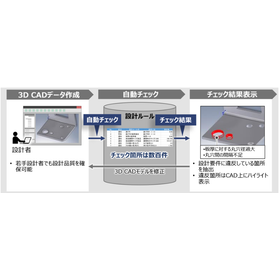
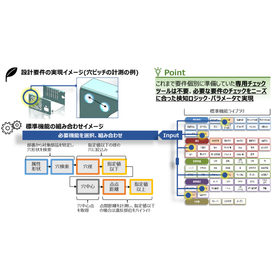
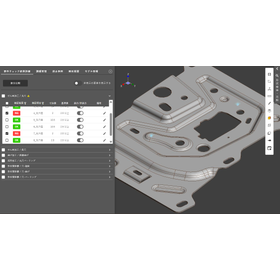
Awareness Support CAD System

Achieve a reduction in design lead time through automatic checks of design rules!

The "Awareness Support CAD System" is a system that analyzes design data and the designer's operation history to detect potential issues and inefficient processes in real-time during the design process. By utilizing past design data and best practices, it provides specific improvement suggestions to designers. It automatically checks 3D CAD models based on design requirements (design rules and ease of processing). Compared to visual checks, it significantly reduces the time required for checks and rework. 【Features】 ■ Real-time problem detection ■ Utilization of knowledge base ■ Analysis of operation history ■ Collaboration features ■ Customizability *For more details, please download the PDF or feel free to contact us.

  • 気づき支援2.png
  • Other CAD related software
  • Support software

Added to bookmarks

Bookmarks list

Bookmark has been removed

Bookmarks list

You can't add any more bookmarks

By registering as a member, you can increase the number of bookmarks you can save and organize them with labels.

Free membership registration

CAM solution "2.5-axis machining"

Creating 2.5D CNC machining tool paths is the most powerful and easy!

The combination of the most intuitive, user-friendly interface, seamless integration with SolidWorks, and the latest tool path technology creates the most powerful and easiest way to generate 2.5D tool paths. Working with parts, assemblies, and sketch shapes to define CNC machining jobs is simple. You can quickly and visually place fixtures and components. 【Features】 - Intuitive and user-friendly interface - Seamless integration with SolidWorks, combined with the latest tool path technology, allows for fast, powerful, and easy creation of 2.5D CNC milling tool paths - Easy work with parts, assemblies, and sketch shapes to define CNC machining jobs - Quick and visual placement of fixtures and components For more information, please contact us or download the catalog.

  • Other CAM related software
  • Support software

Added to bookmarks

Bookmarks list

Bookmark has been removed

Bookmarks list

You can't add any more bookmarks

By registering as a member, you can increase the number of bookmarks you can save and organize them with labels.

Free membership registration

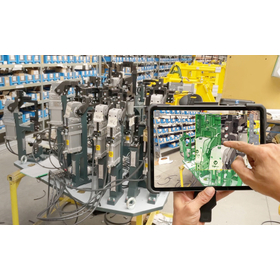
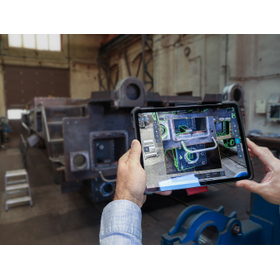
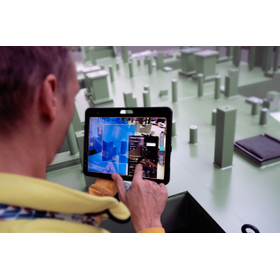
VISOMETRY Corporation AR Visual Inspection Support Software Twyn

Software that assists in the appearance inspection of large and complex shapes, also automatically generates inspection reports.

Software that displays 3D CAD data of products on an iPad and overlays it with the actual object captured by a camera, allowing for comparison and discovery of discrepancies between the data and the physical item. Discovered discrepancies can be recorded in terms of location and condition through freehand drawing, and a photo report can be automatically generated. Key inspection points and areas that require special attention can be set in advance, and by displaying caution instructions on the screen, work time can be reduced. Until now, even visual inspections that required skilled labor can be performed with high accuracy with only minimal training. Typical applications: ✓ Large sheet metal parts ✓ Canned structures ✓ Large jigs - Used for inspections during processes, before shipment, and upon receipt. It helps to identify mistakes arising from forgotten part installations, processing omissions, positional differences, and mix-ups of drawing versions, thereby improving the accuracy of visual inspections and promoting labor-saving measures.

  • 2021-02_SVK_Costumer_Slavia Productions_Jig and Fixture.jpg
  • 2023-10_CSZ_Customer_Loko_IMG-4973.jpg
  • 2024-01_SVK_Customer_SlaviaProductions_DSCF0082.jpg
  • Image Processing Software
  • Support software

Added to bookmarks

Bookmarks list

Bookmark has been removed

Bookmarks list

You can't add any more bookmarks

By registering as a member, you can increase the number of bookmarks you can save and organize them with labels.

Free membership registration

Easy and convenient design tool "DesignFreeQ"

Design FreeQ, developed by pursuing Shark's intuitive drawing capabilities to the limit.

As a design tool that can be considered pre-CAD, it easily materializes diverse ideas and serves as a bridge to CAD/CAM products, creating the beauty of design itself. The "Design Navigator" function automatically displays drawing reference points (such as endpoints, midpoints, contact points, and center points) when the pointer approaches a shape. Furthermore, as the pointer moves, auxiliary lines and extensions of shapes are displayed one after another, eliminating the need to draw many auxiliary lines before drafting. Additionally, editing of drawings can be done freely with the "Shape Editing" function and the "Mask Function," which extracts only the necessary shapes. This is a successor to the drafting board. For more details, please contact us or refer to the catalog.

  • 3D CAD
  • Support software

Added to bookmarks

Bookmarks list

Bookmark has been removed

Bookmarks list

You can't add any more bookmarks

By registering as a member, you can increase the number of bookmarks you can save and organize them with labels.

Free membership registration

[Data] DX of Mechanical Design and Control Design Using 3D CAD

Includes modeling methods and various usage examples along with graphs and diagrams!

This document introduces "DX in Mechanical Design and Control Design Using 3D CAD." It includes trends and current status of DX, modeling methods, various usage examples, and applications, presented with graphs and diagrams. Please take a look. 【Contents】 ■ Current Status and Challenges of DX ■ Operation Instructions ■ Usage Images ■ Application Images *For more details, please refer to the PDF document or feel free to contact us.

  • Company:ITAGE
  • Price:Other
  • others
  • Support software

Added to bookmarks

Bookmarks list

Bookmark has been removed

Bookmarks list

You can't add any more bookmarks

By registering as a member, you can increase the number of bookmarks you can save and organize them with labels.

Free membership registration

Significantly reduce 3D CAD simulation time! Labor cost reduction using AI.

A must-see for 3D CAD engineers in the automotive, machinery, and electronics fields! Significantly reduce analysis execution time by utilizing AI models in simulations!

The "3D Surrogate Model" is a product developed with the intention of training AI using simulation results obtained from existing CAE analysis solvers, and then using the trained AI model to conduct similar simulations. By utilizing AI for simulations, it significantly reduces computation time and, due to its reliance on simple multiplication, prevents analysis results from halting due to divergence. Additionally, it can directly learn from the mesh as an AI model, allowing features such as material properties and edge lengths to be represented. 【Features】 ■ Significant reduction in analysis execution time ■ Stability of analysis processing ■ Improved ease of use ■ Reduction in analysis resources *For more details, please refer to the PDF materials or feel free to contact us.

Added to bookmarks

Bookmarks list

Bookmark has been removed

Bookmarks list

You can't add any more bookmarks

By registering as a member, you can increase the number of bookmarks you can save and organize them with labels.

Free membership registration

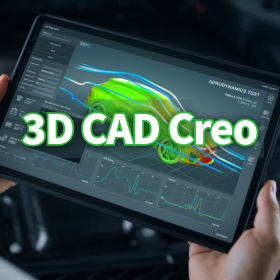
Real-time diagnosis of the design integrity of 3D CAD models.

Visualize the excess and deficiency of geometric tolerances with color! Aim for "Fully constrained."

One of the core features of the Creo GD&T Advisor Extension is the Advisor Tree and the Constraint State Legend. These are essential tools for designers to understand the integrity of the model in real-time during the process of applying GD&T. The Advisor Tree displays information, warnings, and error messages related to the applied GD&T in a hierarchical structure, pointing out design issues and violations of standards. Furthermore, the Constraint State Legend highlights the surfaces on the model with color coding to indicate whether they are "Fully constrained," "Partially constrained," or "Unconstrained" based on the tolerances. This allows for the visual identification of areas with insufficient or excessive tolerances, supporting complete and efficient tolerance design. Please check the details of the Advisor Tree, which prevents overlooking design intent, and the legend that indicates the state of tolerances with colors in the screen captures of the materials.

  • 3D CAD
  • Support software

Added to bookmarks

Bookmarks list

Bookmark has been removed

Bookmarks list

You can't add any more bookmarks

By registering as a member, you can increase the number of bookmarks you can save and organize them with labels.

Free membership registration

Instantly solve geometric tolerance questions! The era when 3D CAD tools become educators.

No need to worry if you don't have knowledge of specifications! We support practical GD&T education.

The Creo GD&T Advisor Extension is not just a tool for checking tolerances; it is also a powerful educational platform with rich help content built in. Even designers who are unfamiliar with GD&T standards can acquire knowledge while progressing with their work. If questions or errors arise regarding the application of GD&T during design, help can be accessed with a simple right-click on the messages displayed in the Advisor Tree. This help feature provides detailed information on the principles of GD&T, interpretations of the standards, and specific solutions to errors. As a result, designers can refer to the standards and acquire GD&T knowledge in a practical context without interrupting their work. This feature eliminates the hassle of flipping through standard documents and allows for immediate access to correct information, significantly contributing to the improvement of GD&T skill levels across the entire design team. Examples of tutorials are also included. For more details on the helpful features that aid in knowledge acquisition, please refer to the documentation. *For more information, please download the PDF or feel free to contact us.*

  • 3D CAD
  • Support software

Added to bookmarks

Bookmarks list

Bookmark has been removed

Bookmarks list

You can't add any more bookmarks

By registering as a member, you can increase the number of bookmarks you can save and organize them with labels.

Free membership registration

Robot programming support software "neoROSET"

neoROSET is a programming tool that allows for robot programming and accurate simulation on a PC.

neoROSET is a programming tool that allows for robot programming and accurate simulation on a PC. By conducting offline verification in advance, it mitigates the risks associated with the implementation of robotic systems.

  • Other industrial robots
  • Support software

Added to bookmarks

Bookmarks list

Bookmark has been removed

Bookmarks list

You can't add any more bookmarks

By registering as a member, you can increase the number of bookmarks you can save and organize them with labels.

Free membership registration

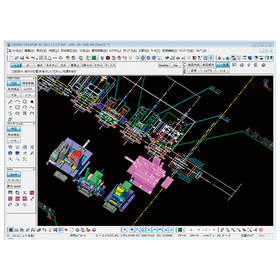
Aerospace CADPAC-CREATOR

Support for strength analysis in the aerospace field using 2D3D integrated design CAD.

In the aerospace industry, advanced strength analysis is essential to ensure the safety and reliability of products. In particular, the design of aircraft fuselages and components must withstand use in harsh environments. Inadequate design can lead to serious accidents. CADPAC-CREATOR integrates 2D and 3D data, making it easy to create and edit the shape data necessary for strength analysis. 【Usage Scenarios】 - Design of aircraft components - Structural design of spacecraft - Strength analysis simulation 【Benefits of Implementation】 - Reduced design time - Improved design quality - Cost reduction

  • cadpac-creator_02.png
  • 2D CAD machine
  • 3D CAD
  • Other CAD
  • Support software

Added to bookmarks

Bookmarks list

Bookmark has been removed

Bookmarks list

You can't add any more bookmarks

By registering as a member, you can increase the number of bookmarks you can save and organize them with labels.

Free membership registration

Finishing Estimation Software [Neo Finishing] Case Study: Daishin Construction Co., Ltd.

It's been about 12 years since its introduction! The more I get used to it, the more I realize what a wonderful software it is!

We would like to introduce a case study of the finishing estimation software "Neo Finishing" implemented by Daijin Construction Co., Ltd. The company faced the challenge of improving the efficiency of its estimation operations at the time of implementation. It was essential for the estimation work to be completed in a short time, and a flexible system was desired. The simple and user-friendly system from Advantech perfectly met these expectations. About 12 years have passed since its implementation (as of November 2021), and both structural and finishing estimations can be linked to CAD data, resulting in a reduction in estimation time. Recently, we learned that we can create 3D models and perspectives based on CAD data drawn for estimation, and we would like to utilize this for sales support. 【Case Overview】 ■ Implementing Company: Daijin Construction Co., Ltd. (Naha City, Okinawa Prefecture) ■ Employee Scale: Less than 100 to 500 people ■ Implemented Software: Neo Finishing *For more details, please refer to the PDF document or feel free to contact us.

  • Software (middle, driver, security, etc.)
  • Support software

Added to bookmarks

Bookmarks list

Bookmark has been removed

Bookmarks list

You can't add any more bookmarks

By registering as a member, you can increase the number of bookmarks you can save and organize them with labels.

Free membership registration

Roller Gear Cam Design and Manufacturing Support Software

Cam and gear software

This is a design and manufacturing support software for roller gear indexed drives. You can select between single duel type, twin dwell type, right twist, and left twist for your design. The cam curves can be chosen from 22 types, and you can create any cam curve from a universal curve. The machining data is generated as text data for simultaneous 4-axis (X-Z-A-B) processing. It can create DXF files for cam diagrams, spider diagrams, and assembly diagrams. Additionally, it can create DXF files for cam bodies, cam grooves, and dwell sections compatible with FreeCAD, allowing you to drag and drop them into FreeCAD to create solid models.

  • 3D CAD
  • Support software

Added to bookmarks

Bookmarks list

Bookmark has been removed

Bookmarks list

You can't add any more bookmarks

By registering as a member, you can increase the number of bookmarks you can save and organize them with labels.

Free membership registration

How to Utilize 3D Data for Estimation | Orizuru 3D

A way of connecting 3D data, which tends to stagnate in the design phase, to estimates and subsequent processes.

By expanding the use of 3D data not only for design but also for estimation, procurement, and manufacturing, overall business efficiency is expected to improve. On the other hand, in the field, there are still operations that revert to 2D drawings and individual confirmations, leading to reliance on experienced personnel for estimation decisions and difficulties in making decisions across departments while looking at the same shapes, often resulting in time-consuming adjustments. Even if 3D modeling progresses in design, the persistence of traditional methods in later processes can prevent the effective utilization of valuable data. "Orizuru 3D" is a product that addresses these challenges by realizing automated estimation/procurement digital transformation (DX). It supports the efficiency of estimation tasks and reduction of dependency on individuals through rule-based cost estimation and price prediction using machine learning, targeting estimation, design, procurement, and manufacturing process design. With lightweight 3D visualization, it becomes easier for related departments to confirm shapes, making it effective in practical applications. 【Features】 ■ Automated estimation ■ Lightweight 3D rendering in a web browser * For more details, please download and view the PDF. Reference Article What is 3DA (3D Annotation)? A Complete Guide from Creation Methods to CAD Selection https://www.cct-inc.co.jp/koto-online/archives/29

Added to bookmarks

Bookmarks list

Bookmark has been removed

Bookmarks list

You can't add any more bookmarks

By registering as a member, you can increase the number of bookmarks you can save and organize them with labels.

Free membership registration

It is not possible to divide the mold for complex model shapes like an engine block.

Issue: "It is not possible to divide the mold for complex model shapes like an engine block."

Once the mold shaping data is prepared, the work of mold splitting begins. Various systems are equipped with different functions to separate the core and cavity. For example, there are functions for gradient angle analysis to detect undercut areas, as well as features that automatically create parting lines and parting surfaces. Cimatron also comes standard with corresponding analysis functions and the ability to create parting surfaces in its model design application. However, for models with complex shapes, mold splitting requires very challenging work, and even highly skilled operators cannot easily achieve the separation.

  • 3D CAD
  • 3D CAM
  • Support software

Added to bookmarks

Bookmarks list

Bookmark has been removed

Bookmarks list

You can't add any more bookmarks

By registering as a member, you can increase the number of bookmarks you can save and organize them with labels.

Free membership registration

CADSUPER for Medical Devices

CADSUPER supporting the design of precision medical devices.

In the medical device industry, precise product design and accurate drawing creation are essential. The accuracy of drawings, which affects the safety and performance of medical devices, directly impacts product quality and patient safety. CADSUPER facilitates design changes with intuitive operations and supports accurate drawing creation. The barcode command option also streamlines drawing management. 【Usage Scenarios】 - Creation of design drawings for medical devices - Response to design changes - Streamlining of drawing management 【Benefits of Implementation】 - Reduction of prototyping time - Decrease in design errors - Reduction of drawing management costs

Added to bookmarks

Bookmarks list

Bookmark has been removed

Bookmarks list

You can't add any more bookmarks

By registering as a member, you can increase the number of bookmarks you can save and organize them with labels.

Free membership registration